How Do I Delete an Agent Chat Conversation?
Last updated: April 14, 2026
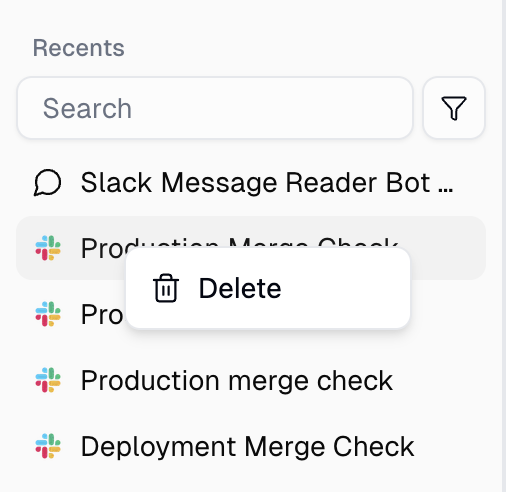
You can delete any agent chat conversation from the sidebar in the agent chat interface. Right-click (or open the context menu) on the conversation in the Recents list and select Delete. You can also restart and clear the current chat using the Restart Chat button in the chat header.
How to Delete a Conversation
Open your agent's chat page.
In the left sidebar, find the conversation you want to delete under Recents.
Right-click the conversation (or click the ⋯ menu icon that appears on hover).
Select Delete from the context menu.
The conversation will be removed from your list immediately.
Good to Know
Conversations disappear from your Recents list once deleted — you won't see them in the sidebar anymore.
Deletion is permanent from your view. The conversation is removed from the chat interface and cannot be recovered or reopened.
Deleting a conversation does not affect the agent itself — your agent's instructions, skills, tools, and settings stay exactly the same.
If you delete the conversation you're currently viewing, you'll be redirected to a new chat automatically.
Each conversation is independent. Deleting one has no effect on any other conversations with the same agent.
Still Need Help?
If this didn't resolve your issue, reach out to support at support@gumloop.com.
Related Docs
Agents — overview of agent configuration and chat behavior