Why Does My Agent Respond to Every Message in a Slack Thread (or Stop Responding)?
Last updated: March 21, 2026
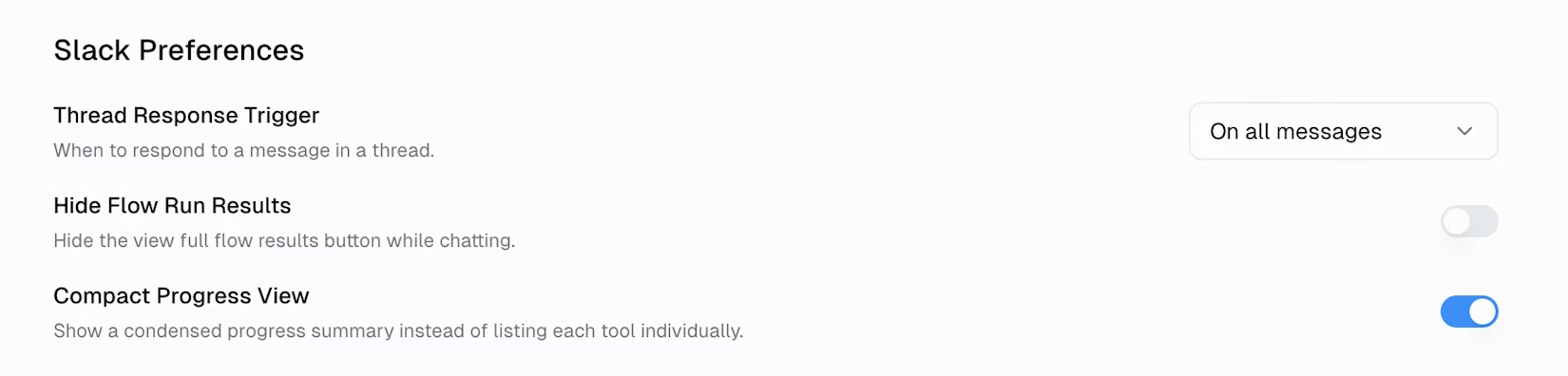
This is controlled by the Thread Response Trigger setting in your agent's Slack Preferences. Set it to "Only on Mentions" if the agent responds too much, or "On All Messages" if it's not responding enough. Note: the agent also automatically switches to mention-only when 3 or more people are talking in the same thread.
The Two Modes
Every Slack agent has a Thread Response Trigger setting that controls whether it participates in thread replies automatically or waits for an @mention:
Only on Mentions (recommended, default) — The agent only responds when someone explicitly
@mentionsit. Your team can discuss freely in the thread without triggering the agent. Best for most use cases.On All Messages — The agent responds to every reply in the thread, no @mention needed. Best for dedicated support channels or active collaboration where the agent should stay engaged in every message.
Automatic Switch: Multi-Participant Threads
If your agent is set to On All Messages and 3 or more different people participate in the same thread, the agent automatically switches that thread to mention-only. When this happens, the agent posts a notification in the thread:
🔔 Multiple participants detected in this thread. I will now only respond when mentioned directly with @.
Key details about this behavior:
The switch applies to that specific thread only — it does not change your agent's global setting
The count includes everyone who has posted in the thread, even people who don't have a Gumloop account
Once triggered, the thread stays in mention-only mode — it does not revert back
This only happens when the agent is set to On All Messages. If you're already using Only on Mentions, there's no change to announce
To get the agent's attention in that thread after the switch, just
@mentionit
How to Change the Setting
Open your agent's settings page
Scroll to Slack Preferences
Change the Thread Response Trigger dropdown
Changes take effect immediately for new conversations
Common Scenarios
"My agent won't stop responding in threads"
Your Thread Response Trigger is set to On All Messages. Switch it to Only on Mentions. After the change, your team can talk in threads normally — the agent only jumps in when someone @Gumloops it.
"My agent stopped responding mid-thread"
Two possible causes:
Multi-participant switch — If a third person joined the thread, the agent automatically switched to mention-only. Look for the 🔔
Multiple participants detectednotification in the thread. Add@Gumloopto your next message to continue.Already on "Only on Mentions" — Your follow-up messages need an @mention to get a response. Either add
@Gumloopto your messages, or switch the setting to On All Messages if you want a fully conversational experience.
"My agent responded to everyone, then suddenly stopped"
This is the multi-participant override in action. Once 3+ people are in the thread, the agent posts the 🔔 notification and switches to mention-only for that thread. This prevents the agent from interrupting group discussions. Use @Gumloop when you specifically want its input.
Still Need Help?
If the setting is correct but the agent still isn't behaving as expected, check that the agent is properly added to the channel and that your Slack email matches your Gumloop account email. See our Using Agents in Slack guide for the full setup.
If that doesn't resolve it, reach out to support at support@gumloop.com.