How to Choose the Right AI Model for Your Agent
Last updated: April 21, 2026
Under Agent Preferences, your agent already has a model selected — by default it's set to a Recommended model (Claude 4.6 Sonnet). You don't need to change it. It handles most tasks well. This article explains when to change it and what to pick instead.
Where to find and change your model
In your agent config, the Agent Preferences section shows your currently selected model. Click that to open the model picker and choose a different one.
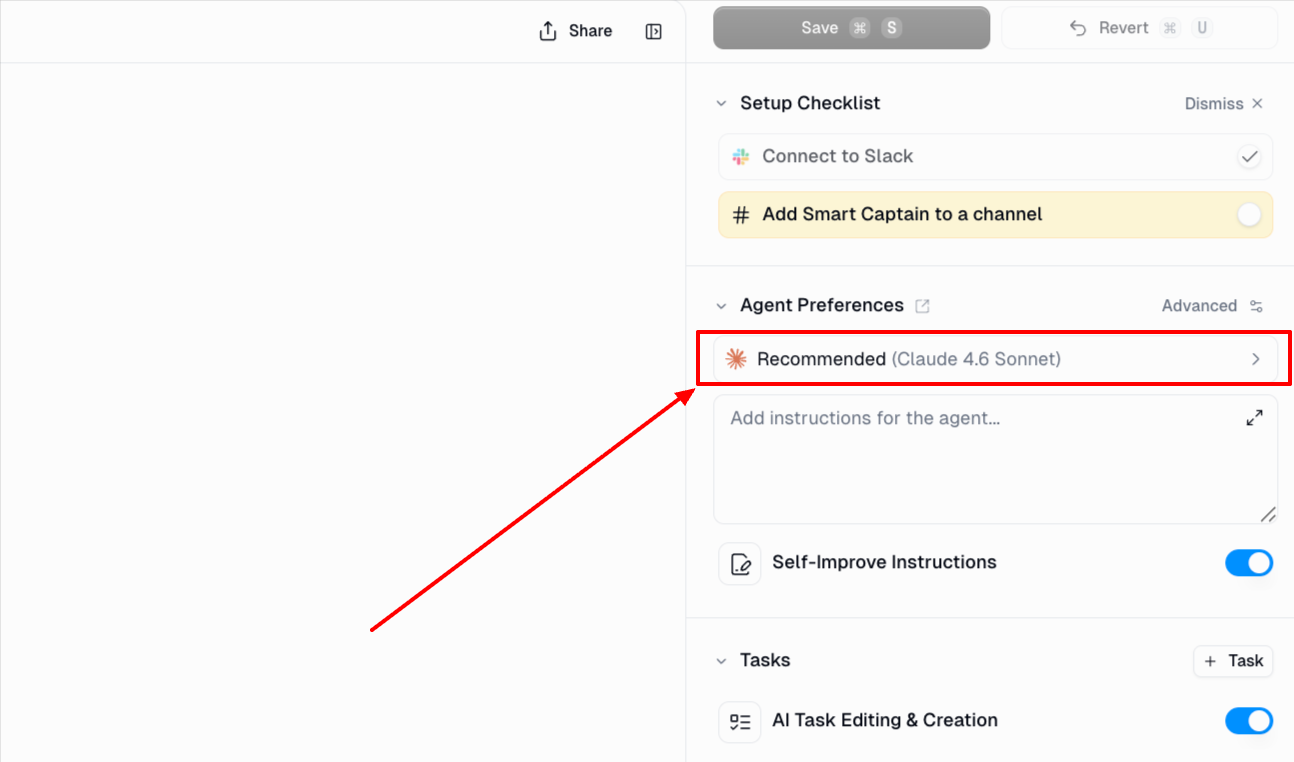
The model controls how your agent thinks — how fast it responds, how deeply it reasons, and how much text it can handle at once. The picker shows a Speed bar, an Intelligence bar, and a Context window size for each model.
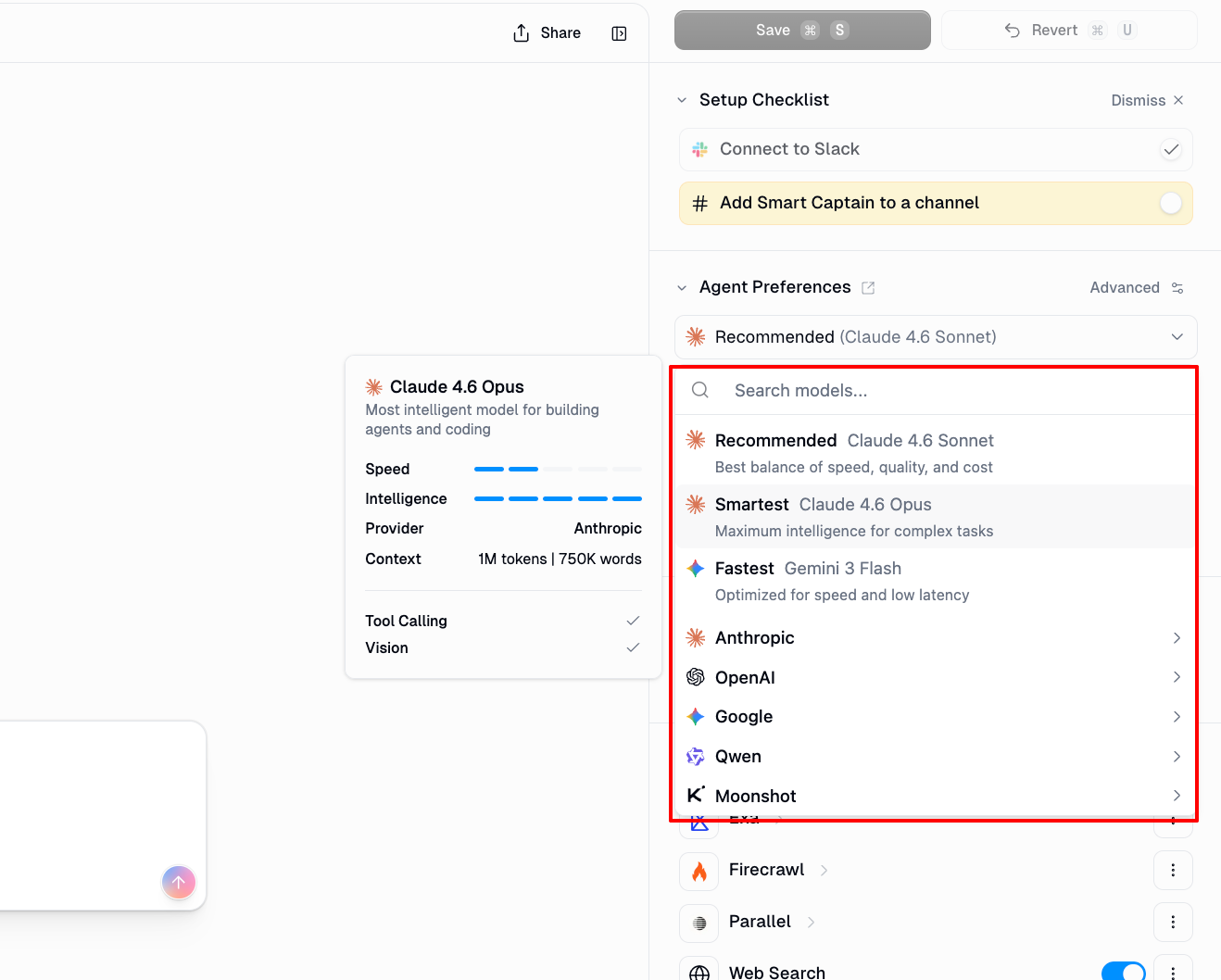
When to change it and what to pick
You need faster responses
Pick Fastest (Gemini 3 Flash) — it's pinned at the top of the picker. Use it for simple, high-volume tasks: classifying content, extracting specific fields, reformatting data. It's noticeably faster but less nuanced than the default.
The default isn't reasoning well enough
Pick a Smartest model — Claude 4.7 Opus is the strongest option and what the Smartest preset selects by default. Other top-tier options include Claude 4.6 Opus, GPT-5.4, Gemini 3.1 Pro, and Grok 4. These all have the highest intelligence rating and are built for complex, multi-step reasoning: detailed analysis, difficult decisions, tasks where the default makes mistakes. They're slower and use more credits per message.
You want to reduce credit consumption
Pick Gemini 3 Flash, Claude 4.5 Haiku, or GPT-5.4 Nano. All three are fast, low-cost models that work well for straightforward tasks. Use them when your agent is handling high volumes or running on a tight credit budget and the task doesn't require deep reasoning.
You're getting a context window error
You'll see such errors when your conversation or document is too long for the model. Switch to any model showing 1M in the Context column of the picker.
prompt reached 213,009 tokens, which is over the 200,000 token maximum for Claude 4.5 OpusContext window
Models to pick
1M tokens
Claude 4.7 Opus, Claude 4.6 Opus, Claude 4.6 Sonnet, Claude 4.5 Sonnet, GPT-5.4, Gemini 3.1 Pro, Gemini 3 Flash
400K tokens
GPT-5.4 Mini, GPT-5.4 Nano, GPT-5.3 Codex, GPT-5.2, GPT-5.2 Codex
256K tokens
Grok 4, Qwen3.5 397B, Kimi K2.5
200K tokens
Claude 4.5 Haiku
128K tokens
Grok 3, Grok 3 Mini, Perplexity Sonar Pro, Perplexity Sonar Reasoning Pro
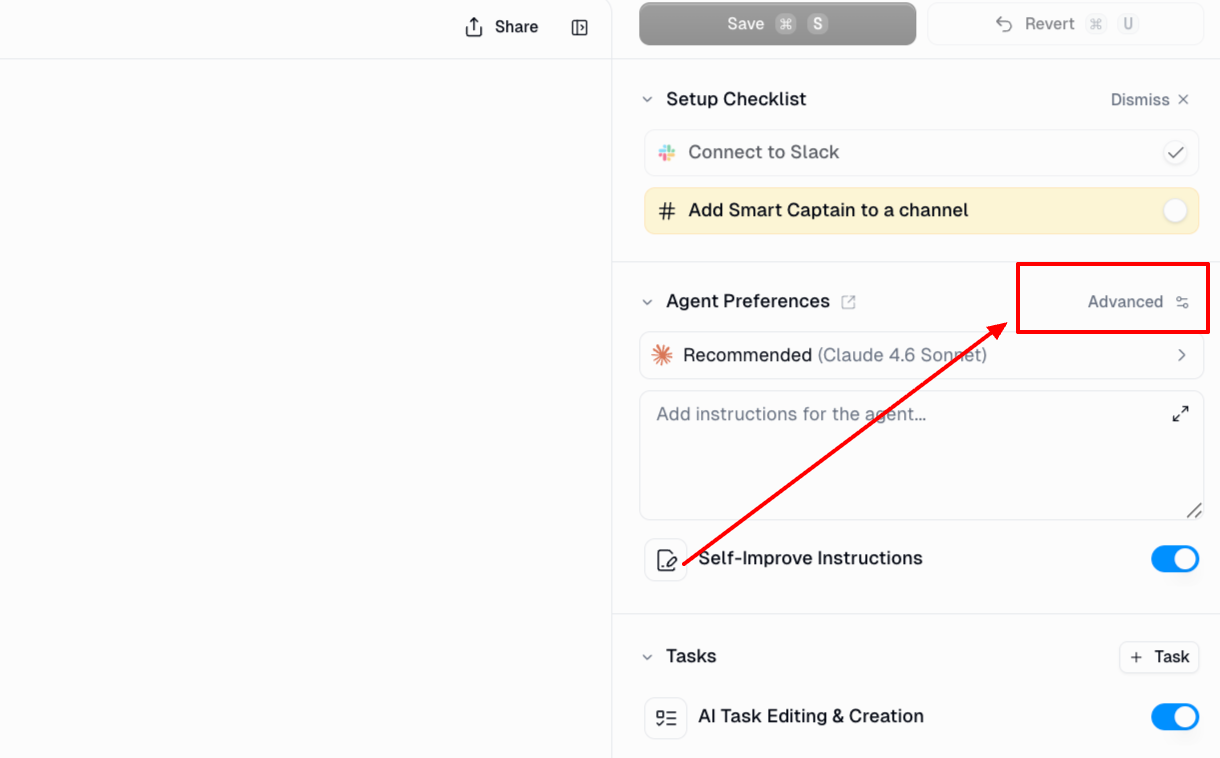
Tip: For long-running conversations, turn on Auto Summarization under Advanced next to the model selector. It compresses older messages automatically so you're less likely to hit the limit.
All available models at a glance
The model picker groups models by provider. Here's every active model, with its context window and what it's best for.
Provider | Model | Context | Best for |
Anthropic | Claude 4.7 Opus | 1M | Strongest reasoning overall. Complex analysis, multi-step decisions. |
Anthropic | Claude 4.6 Opus | 1M | Near-top intelligence with 1M context. Great all-round expert model. |
Anthropic | Claude 4.6 Sonnet | 1M | Default (Recommended). Best balance of speed, intelligence, and cost. |
Anthropic | Claude 4.5 Haiku | 200K | Fast and cheap. Simple classification, reformatting, high-volume tasks. |
OpenAI | GPT-5.4 | 1M | Top-tier intelligence at scale. Agentic, coding, and professional workflows. |
OpenAI | GPT-5.4 Mini | 400K | Strong mini model for coding and sub-agents. Good speed/intelligence balance. |
OpenAI | GPT-5.4 Nano | 400K | Cheapest GPT-5.4-class model. Simple, high-volume tasks on a budget. |
OpenAI | GPT-5.3 Codex | 400K | Long-horizon agentic coding tasks. Most capable code-focused model. |
OpenAI | GPT-5.2 | 400K | Strong general-purpose expert model for coding and agentic tasks. |
OpenAI | GPT-5.2 Codex | 400K | Intelligent coding model for long-horizon code generation and review. |
Gemini 3.1 Pro | 1M | Expert-tier reasoning with the largest context window. Multimodal tasks. | |
Gemini 3 Flash | 1M | Fastest preset. Extremely fast with 1M context. Best speed-to-cost ratio. | |
xAI | Grok 4 | 256K | Expert-tier intelligence. Strong reasoning alternative to Opus/GPT-5.4. |
xAI | Grok 3 | 128K | Solid advanced-tier model for general-purpose tasks. |
xAI | Grok 3 Mini | 128K | Fast and lightweight. Good budget option from xAI. |
Qwen | Qwen3.5 397B | 256K | Expert-tier. Strong at non-English content, math, and structured reasoning. |
Moonshot | Kimi K2.5 | 256K | Expert-tier with strong agentic reasoning. Good for long, tool-heavy tasks. |
Perplexity | Sonar Reasoning Pro | 128K | Web-grounded reasoning with citations. Best when answers need real-time sources. |
Perplexity | Sonar Pro | 128K | Fast web search with cited answers. Good for quick fact lookups. |
Perplexity | Sonar Deep Research | 128K | Deep web research with synthesis. 100 credits per call — use for thorough investigations only. |
A few things worth knowing
Your agent can't switch its own model
Once you set a model in Agent Preferences, it stays there for the entire conversation. Even if you tell your agent in its instructions to "use a different model for this step," it won't be able to do that. You would need to manually change it.
You can set a fallback model for outages and errors
Fallback is enabled by default. If a model goes down or returns an error, your agent automatically tries the next model in the chain — with no interruption. You can customize the fallback chain under Advanced next to the model selector.
Use a Drive link to share large files with your agent
Claude models have a 25–30 MB limit on the total size of files attached inline to a message. If you're attaching several large PDFs and seeing errors, this is likely why — it's separate from the context window.
Fix: upload your files to a Google Drive folder and share the folder link with your agent instead. Follow the steps here.
When to try models from other providers
The three pinned presets (Recommended, Smartest, Fastest) cover most use cases. If you need something specific, the provider lists give you more choice — Anthropic and OpenAI for the widest model range, Google for large context and multimodal tasks, xAI (Grok) as a strong reasoning alternative, Qwen for non-English content or math-heavy tasks, Moonshot (Kimi) for agentic tasks requiring strong tool-calling, and Perplexity for tasks that need web-grounded answers with citations.
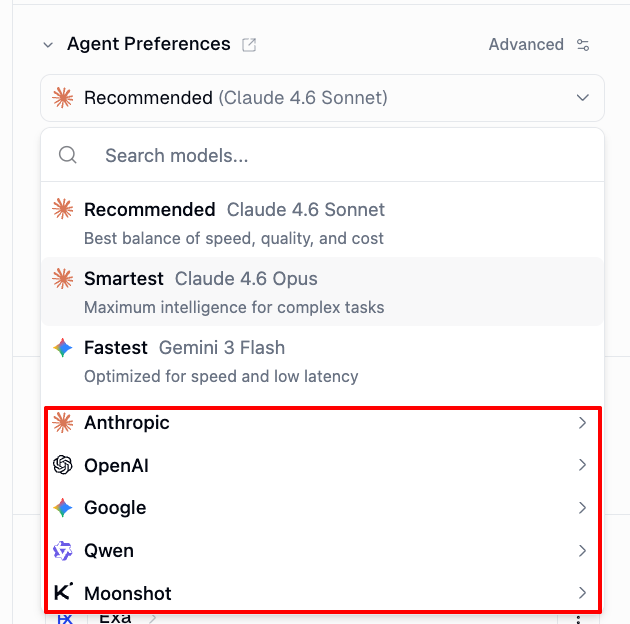
Start with the defaults and only switch if you have a reason to. Test your agent before committing to a new model.
Model selection in workflows
In workflows, each AI node (Ask AI, Extract Data, Categorizer, etc.) has its own Model dropdown. Unlike agents, workflow costs are fixed — you know exactly what each node will cost before it runs.
Tier | Credits per node call | Example models |
Budget | 2 credits | GPT-5.4 Mini, GPT-5.4 Nano, Claude 4.5 Haiku, Gemini 3 Flash, Grok 3 Mini |
Advanced | 20 credits | Claude 4.6 Sonnet, Claude 4.5 Sonnet, Grok 3, Perplexity Sonar Reasoning Pro |
Expert | 30 credits | Claude 4.7 Opus, Claude 4.6 Opus, GPT-5.4, GPT-5.3 Codex, Gemini 3.1 Pro, Grok 4, Qwen3.5 397B, Kimi K2.5 |
Research | 100 credits | Perplexity Sonar Deep Research |
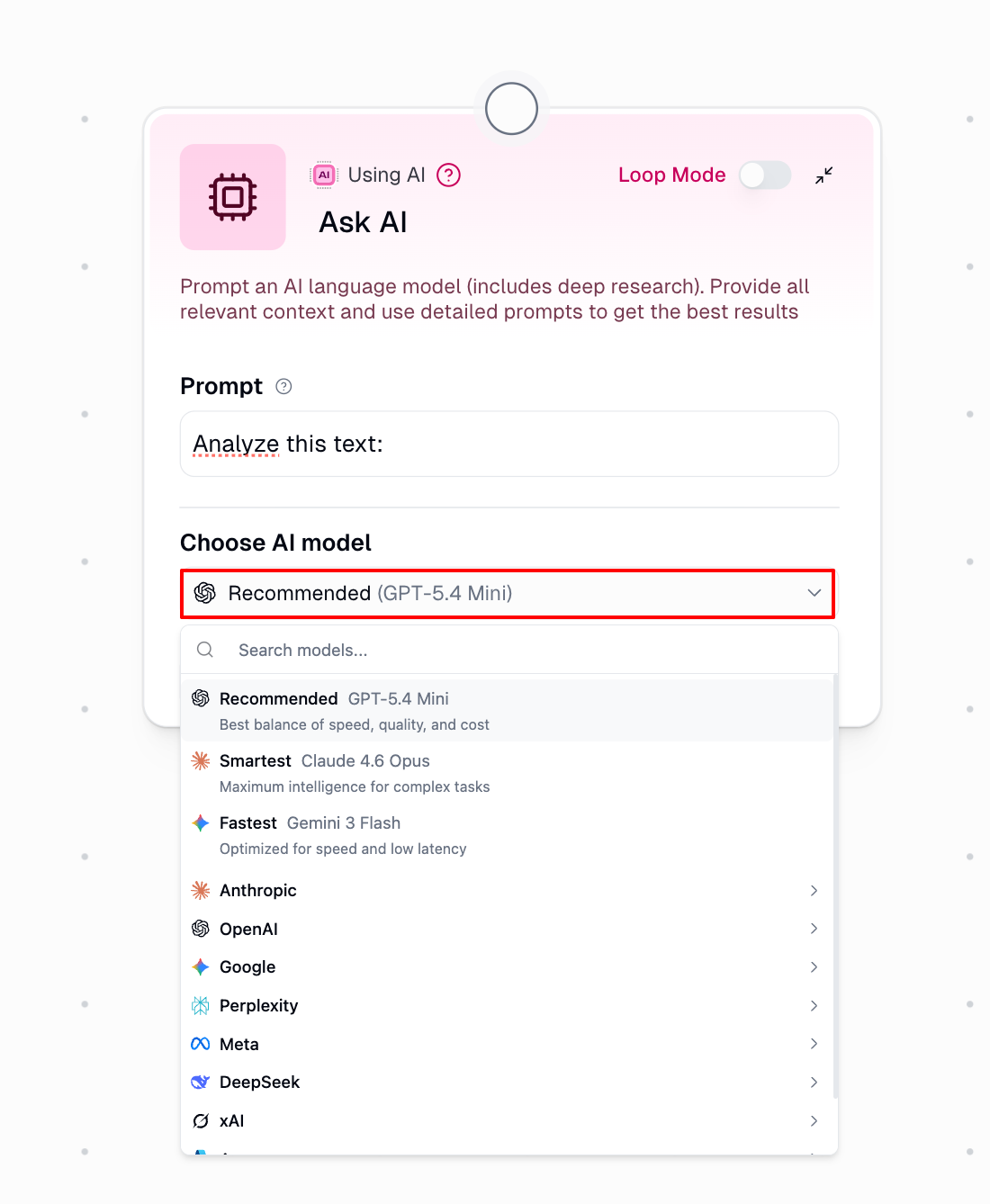
You can use different models across nodes in the same workflow — a cheaper model for simple steps, a more powerful one where the task needs it. Hover over the ? icon on any node to see its credit cost before running.
Still Need Help?
If you're not sure which model to pick for your use case, reach out at support@gumloop.com or in the shared Slack channel.